Low Power LED Display: Where the Watts Actually Go
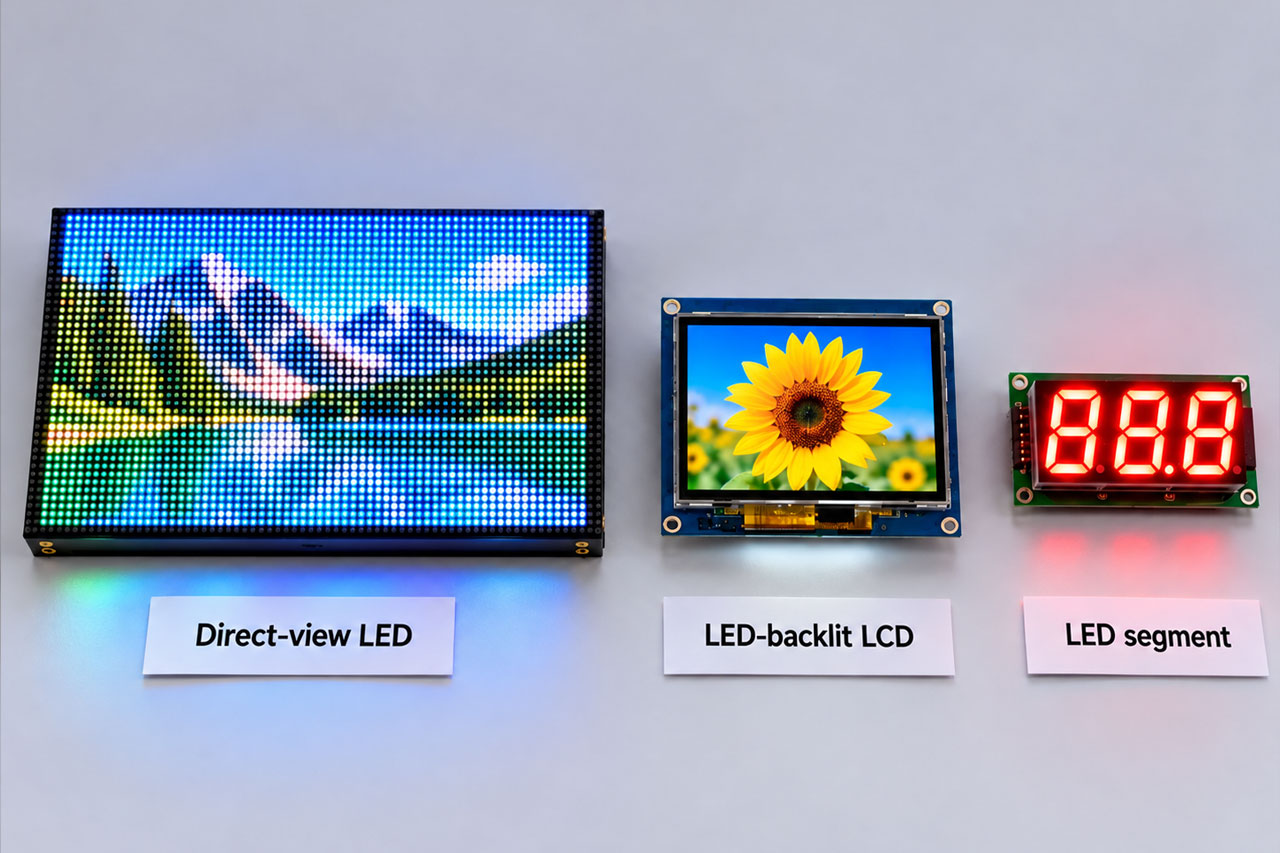
“Low power LED display” is one of those phrases that sounds precise and is not. It can mean a direct-view LED video wall, an LCD module with an LED backlight, or a segment display on a control panel. The three have almost nothing in common electrically, and advice that helps one can be wrong for the others.
What they do share is a budget. Every display spends power in four places: making light, driving the pixels, moving data, and waiting. The technology decides which line dominates.
Get that order right and the savings are straightforward. Get it wrong and you spend money on the wrong component — a “low-power panel” behind an inefficient backlight, or an efficient driver on a screen that is simply too bright.
The Short Answer: Three Products, Three Different Levers
A low power LED display is not a single product category — it is a power budget. Every display’s power is the sum of four lines: light (emission or backlight), drive, interface and standby. In a direct-view LED screen, drive architecture and average brightness dominate. In an LED-backlit LCD module, the backlight dominates at roughly 70–90% of the total. For static, always-on content, the biggest saving may come from a different technology altogether, such as memory-in-pixel or reflective LCD.
Three meanings of “low power LED display”
| Type | What "LED" means | Dominant power line | Main levers |
|---|---|---|---|
| Direct-view LED screen | Every pixel is an LED | Drive architecture and average brightness | Common cathode supply, efficient driver ICs, dynamic and black-screen saving, lower brightness |
| LED-backlit LCD module | LEDs sit behind the liquid crystal | Backlight, typically 70–90% | PWM dimming, efficient boost driver, low-update interfaces, deep sleep |
| LED segment / dot-matrix | Indicator LEDs form digits or icons | Number of lit segments | Duty cycle, multiplexing, low drive current |
Ask “where does the power go?” before asking “which display should I buy?” — in the wrong order, saving power is luck.
The Power Budget, Line by Line
Split a display’s consumption into four lines and you know which number to discuss with a supplier. The same framework works for a stadium screen and for a 1.5-inch watch module; only the proportions change.
The four-line power budget
| Budget line | Direct-view LED screen | LED-backlit LCD module |
|---|---|---|
| Light | The LED pixels themselves — by far the largest share | The backlight — typically 70–90% |
| Drive | Row and column driver ICs, scanning | Source and gate drivers, timing controller |
| Interface | Sending and receiving cards, network | SPI, QSPI, RGB, MIPI or LVDS link |
| Standby | Black-screen and sleep modes | Sleep and deep sleep, backlight off |
Two illustrations show the scale of a low power consumption LED display budget. A representative 3.5-inch TFT module running at full brightness might draw about 200 mW, of which roughly 160 mW is backlight and 40 mW is drivers and logic — the backlight is 80% of the bill. A direct-view screen is measured per square metre instead: one indoor 1.5 mm pitch LED cabinet, for example, is rated at 110 W/m² average and 330 W/m² maximum at 600 nits. The three-to-one gap between average and maximum is itself a lesson, and we return to it below.
If you are new to how LCD panels are built, our guide to the Types of LCD Displays explains the glass, module and panel types this article refers to.
If the Screen Is Made of LEDs: Common Cathode vs Common Anode
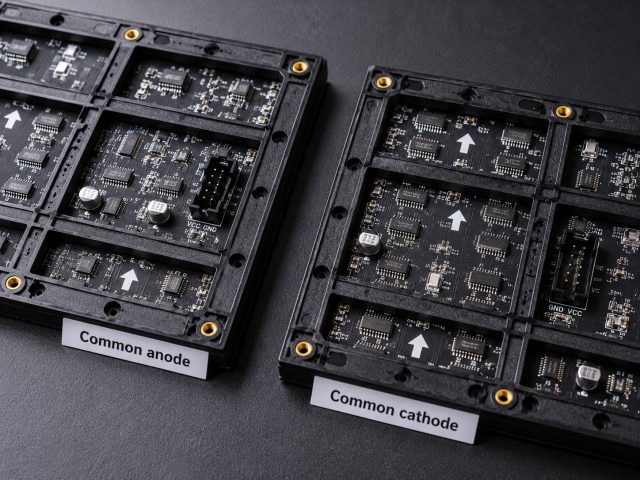
Most searches for a low power consumption LED display are about direct-view screens: video walls, meeting-room fine-pitch displays and signage. Here the single biggest architectural lever is how the red, green and blue LEDs are powered.
Why splitting the supply saves power
Common anode vs common cathode
| Architecture | How it is powered | Where power is lost |
|---|---|---|
| Common anode | Red, green and blue share one higher supply rail, typically around 4.2–5 V | A red LED needs only about 1.8–2.2 V forward voltage. The excess voltage on the shared rail is dropped in the driver and turned into heat. |
| Common cathode | Red runs from its own low-voltage rail; blue and green share a second rail sized for their ~2.8–3.4 V forward voltage | Much of the wasted headroom disappears, so both power and temperature fall. |
Reading the savings honestly
Marketing for low power indoor LED displays often quotes savings of 50% or more. Those figures exist, but they are best cases. Broken into layers, the picture looks like this:
Common cathode savings, layer by layer
| Layer | Typical saving | What it includes |
|---|---|---|
| Rail splitting only | On the order of 20% | Red and blue-green on separate supplies, otherwise unchanged |
| Split rails + common cathode driver IC | About 30% measured | Chipone published a test of identical modules: 22.09 W common cathode vs 31.45 W common anode, with the lamp surface 12.4 °C cooler after aging |
| Plus dynamic and black-screen saving | Roughly 30–40% in a real system | Driver features that cut current on dark content and idle areas |
| Headline vendor claims | 50% and above | Best case under favourable content and test conditions — not a general value |
Common cathode doesn’t save “electricity” in general — it removes the wasted voltage headroom on the red channel.
Cooler modules matter beyond the power bill: lower LED and IC temperatures slow colour shift and ageing, which is why many fixed installations now specify common cathode as standard for a low power indoor LED display.
Sourcing a China low power consumption fixed LED display
If you are buying a China low power consumption fixed LED display or a China low power consumption indoor fixed LED display for a permanent installation, ask the supplier four things: whether the cabinet is common cathode, which driver IC it uses, the average and maximum power per square metre at a stated brightness, and the power in black-screen or sleep mode. A quote that gives only “max power” tells you about the power supply, not the electricity bill.
Huaming does not build direct-view LED walls. We manufacture LED-backlit TFT LCD modules, which is where the next section — and the rest of this article — applies directly.
If the LEDs Are Behind the LCD: The Backlight Is the Whole Game
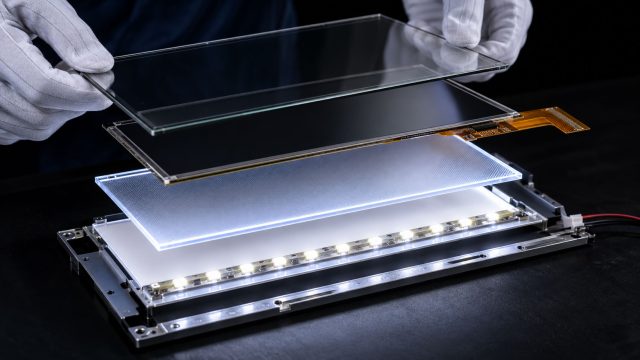
In an LED-backlit LCD module — the kind of low power LED display used in handheld, wearable and battery-powered products — the liquid crystal itself draws very little. The LEDs behind it typically account for 70–90% of the module’s power. That changes the strategy completely: swapping to a “more efficient panel” usually matters less than how bright the backlight runs, how efficiently it is driven, and whether it truly switches off.
Five levers for a low power LCD module, ranked by return
| Lever | Typical effect | Engineering notes |
|---|---|---|
| 1. Backlight dimming (PWM) | Backlight power falls roughly in line with brightness; 50–80% savings are common in practice | Run PWM well above 200 Hz (many designs use kHz ranges) to avoid visible flicker. DC dimming saves less and can shift colour at low levels. |
| 2. Efficient backlight driver | Synchronous boost drivers commonly reach about 88–95% efficiency; linear drivers can fall to 60–75% | Check quiescent current, soft start and ambient-light control. |
| 3. Deep sleep | Cuts idle draw to a small fraction of active power | Distinguish "standby" (image held, backlight on or dimmed) from "deep sleep" (backlight off, timing signals stopped, DC-DC off). |
| 4. Interface choice | Smaller than the backlight, but matters for battery devices | SPI and QSPI use few lines and suit slow-updating content; RGB and MIPI suit higher resolutions and frame rates. |
| 5. Panel transmittance and optics | Indirect | A brighter-transmitting panel or optical bonding lets the backlight run lower for the same perceived brightness. |
Combined, dimming, an efficient driver and proper sleep routinely cut a module’s average draw by more than half, and often far more in products that spend most of their time idle.
In an LCD, most of the saving is in the backlight — and most of the backlight saving is in “how bright does it need to be?” and “is it really off when it’s off?”
The Test-Condition Trap: Why Two “Low-Power” Datasheets Cannot Be Compared
The quickest way to be misled is to compare two power figures measured differently. A low power LED display rated “5 W” and another rated “8 W” may be identical once brightness, content and test method are aligned.
Questions to ask about any power figure
| Question | Why it matters |
|---|---|
| At what brightness (nits)? | Halve the brightness and backlight or LED power roughly halves. A figure without brightness is meaningless. |
| With what content? | Full white, typical video and black screen can differ by a large factor on direct-view LED. |
| Maximum or average? | The indoor LED example above is rated 330 W/m² maximum but 110 W/m² average — a 3:1 gap. |
| Does it include drivers, interface and standby? | Panel power" alone can leave out the backlight and drivers entirely. |
| At what voltage and temperature? | As a battery discharges, a boost driver draws more current for the same light output. |
| Which dimming method? | PWM and DC dimming have different efficiency curves. |
Every low-power figure needs three conditions to be meaningful: brightness, displayed content, and whether it is maximum or average. Ask suppliers to quote at the same brightness, the same content and the same measurement basis before you compare.
A power figure without its test conditions isn’t a specification. It’s an adjective.
Sizing a Battery: A Worked Example
For any low power LED display on battery, percentages become meaningful once they are turned into hours. Take the representative 3.5-inch TFT module from earlier — 160 mW backlight plus 40 mW drivers and logic, 200 mW at full brightness — running from a 3.7 V, 1,000 mAh battery (3.7 Wh). For simplicity, converter losses and the rest of the product are ignored.
Same display, three operating strategies
| Scenario | Average power | Display-only runtime |
|---|---|---|
| Always on, full brightness | 160 + 40 = 200 mW | About 18.5 hours |
| Always on, backlight dimmed to 30% (PWM) | 48 + 40 = 88 mW | About 42 hours |
| 30% brightness, active 10% of the time, deep sleep (~0.5 mW) otherwise | 8.8 + 0.45 ≈ 9.3 mW | About 400 hours |
The same module gives anywhere from under a day to more than two weeks. The display sets the starting point; the system strategy sets the result.
Battery life isn’t something you buy. It’s something you configure.
When “Low Power” Means a Different Technology
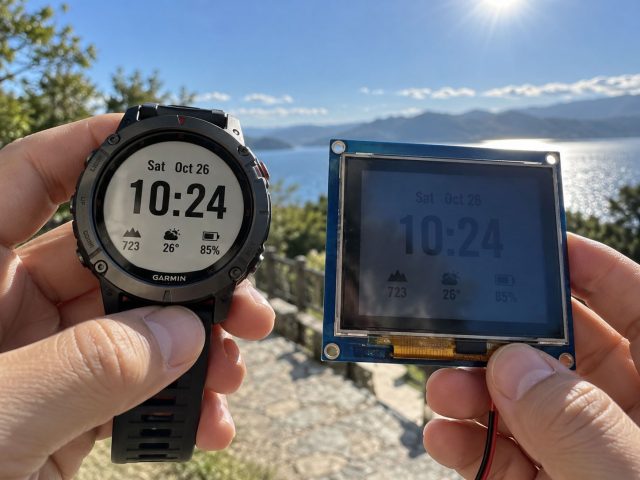
Sometimes the right answer is not a more efficient backlit display but a display that needs no backlight at all.
Display technologies by power profile
| Technology | Static power | Good for | Not ideal for |
|---|---|---|---|
| Memory-in-pixel (MIP) | Microwatts | Always-on watches, labels, outdoor readability | High-frame-rate video, large full-colour |
| Reflective / transflective LCD | Very low with backlight off | Bright environments, slow updates | Colour use in the dark |
| Electronic paper | Holds image with no power | Static text, shelf labels | Video, fast interaction |
| Backlit TFT LCD | Tens to hundreds of mW | Colour, video, touch, wide temperature | Ultra-low static always-on |
Manufacturer figures show the scale: Kyocera quotes static power for its MIP displays down to 5 µW, with typical values around 10–12 µW static and 35–95 µW while rewriting; Sharp quotes 12 µW for a 1.35-inch Memory LCD and under 15 µW for a 1.26-inch model, both with a static image.
If a product shows mostly static information on battery, MIP or reflective technology may beat any backlit TFT. If it needs colour video, touch interaction or a wide automotive temperature range, a backlit TFT is still the right choice — it is a question of fit, not of which technology is “more advanced”.
Sometimes the lowest-power display isn’t a more efficient LCD. It’s a different kind of display.
The BOM Checklist: How to Compare Two Quotes
What to request from every display supplier
| # | Ask for | Why |
|---|---|---|
| 1 | Power (mW or mA) at a stated brightness | Comparisons without brightness normalisation are invalid |
| 2 | Backlight current and driver efficiency | Shows whether the backlight is driven efficiently |
| 3 | Interface type and update pattern | Determines how long the system can sleep |
| 4 | Standby and deep-sleep current (µA) | Decides shelf life and idle drain of battery devices |
| 5 | Dimming method and minimum brightness | PWM frequency and colour stability at low levels |
| 6 | Power across the operating temperature range | Essential for automotive and outdoor products |
| 7 | Full test conditions | A figure without conditions should be sent back |
Whether you are buying a low power consumption LED display wall or a small LCD module, compare the test conditions of two quotes before you compare their numbers. If the conditions differ, the numbers are not comparable.
Why Huaming: Low-Power Configurations on a Custom TFT Platform
Jiangxi Huaming Wisdom Display Technology Co., Ltd. is a TFT LCD Module Manufacturer building modules from 0.96 to 10.1 inches — including round, square, bar-type, portrait and in-cell touch formats — in an IATF 16949 certified factory in Shanggao, Jiangxi.
For battery-powered and always-on products, we set the power budget at the module level, not just the panel:
- QSPI, SPI, RGB, MIPI and LVDS interfaces, chosen for your update pattern rather than pin count
- Backlight brightness specified to your real target, with PWM dimming and low-quiescent-current drivers
- Sleep and deep-sleep configurations that shut down the backlight and DC-DC, not just the image
- Round (1.46″, 3.6″), square (1.8″, 3.95″), bar-type (2.86″, 3.69″) and automotive formats for space-constrained designs
- Optical bonding for touch versions, reducing reflection so the backlight can run lower
Tell us the brightness you actually need, the update pattern, the battery capacity and the target runtime. We will configure a Custom LCD Display and give you the current at your operating point — not a headline number at full white.
Frequently Asked Questions
What is a low power LED display?
The phrase covers three different products: a direct-view LED screen where every pixel is an LED, an LCD module lit by an LED backlight, and an LED segment or dot-matrix display. Each saves power differently. Direct-view screens depend on drive architecture and average brightness, LED-backlit LCD modules depend mostly on the backlight, which is typically 70–90% of module power, and segment displays depend on how many segments are lit and for how long.
How much power does a low power LED display actually use?
There is no single figure, because power depends on brightness and content. Direct-view LED screens are rated in watts per square metre; one indoor 1.5 mm pitch LED cabinet, for example, is rated at 110 W/m² average and 330 W/m² maximum at 600 nits. Small LCD modules are measured in milliwatts. Numbers without brightness, content and test conditions cannot be compared.
Does common cathode really save 50–75%?
Figures that high are best cases. Splitting the red and blue-green supply rails alone saves on the order of 20%. With a driver IC designed for common cathode, Chipone published a test on identical modules showing 22.09 W against 31.45 W — about a 30% reduction — with a lamp surface 12.4 °C cooler. A realistic expectation for a complete system is roughly 30–40%.
What is the biggest power consumer in an LCD module?
The LED backlight, which typically accounts for 70–90% of an LCD module’s power. Source and gate drivers, timing logic and the interface take the rest. The most effective savings therefore come from dimming the backlight, using an efficient backlight driver, and switching the backlight fully off when the display is not needed.
Does the display interface affect power consumption?
Yes, but less than the backlight. Serial interfaces such as SPI and QSPI use few signal lines and suit slow-updating battery devices, while parallel RGB and MIPI suit higher resolutions and frame rates. The bigger saving usually comes from matching the update rate to the content, so the system can spend more time asleep.
Can I just lower the brightness to save power?
Yes, and it is usually the highest-return step, because backlight power falls roughly in line with brightness. Use PWM dimming at a frequency well above 200 Hz to avoid visible flicker, check colour at low DC-dimmed levels, and confirm the display is still readable in the brightest lighting the product will meet.
When should I use a memory-in-pixel or reflective display instead?
When the content is mostly static, always on and battery powered. Memory-in-pixel displays hold a static image on microwatts; Kyocera quotes static power down to 5 µW and Sharp quotes 12–15 µW for small Memory LCDs. For colour video, touch interaction or wide-temperature automotive use, a backlit TFT LCD remains the better fit.